December 14, 2011

What are YOU interested in seeing a post on?

Typically, the blog posts I make are related to an issue that a client is currently experiencing and the resolution we arrived at.  Sometimes, it's something cool I learned along the way by reading other blogs that I follow.  However, the main reason I publish a blog is to provide YOU, the users who are kind enough to read my ramblings, insight into how to do things better, faster, easier in Dynamics GP.

To that end, I'd like to know what you would like to see a post on.  Do you have a particularly sticky issue that you haven't been able to find an answer to?  If so, leave a comment on this post and we'll see what we can do.

Thanks!  Frank

November 24, 2011

Happy Thanksgiving and a Turkey Day Tip

Looking for a particular 3rd party product to augment Dynamics GP, CRM, or any other Dynamics product?  ISV Central provides a great searchable compilation of products for your reference and research.  Visit ISV Central by clicking on their logo below.


Wishing you all a safe and healthy Thanksgiving holiday!


November 23, 2011

Add Logical Argument Field to SmartList via SmartList Builder

I'm no SQL guru but I needed to add a column in SLB that evaluates the results in another column in the SmartList (basically an IF, THEN, ELSE statement) and ran across this great tip on Devon Southall's Dynamics GP Builders & Reporting blog.

Thought I'd share it with you . . .


Thanks Devon!

It's Year End Already???!!!

Hard to believe but it's time to start thinking about closing the year again.  In that spirit, you may find some of my previous Year End Close articles helpful.  Click on the calendar image to jump to the articles.
Good luck!

November 21, 2011

MSDynamicsWorld Decisions Fall 2011 Coming up in 14 Days!

Don't forget to register for Decisions Fall 2011 to gain new insights into Dynamics GP.  Remember, this is one conference that is FREE!  Click on the logo below to register and attend this conference from the comfort of your own desk.

* click image to enlarge

I'll be participating in the Microsoft Dynamics GP MVP Roundtable with fellow MVPs Mariano Gomez, Mark Polino, and Jivtesh Singh.  Join us for a fun and exciting discussion about all the things you always wanted to know about GP but were afraid to ask.

November 16, 2011

GP10 SP2 User Login Hangs at Homepage Rendering

Had a client run into this situation.  Upon logging in to a brand new client install of GP 10, her login would hang during rendering of the Homepage.  I tried turning off all the Homepage elements, thinking it was probably Metrics or Outlook making it hang.  That didn't help.  I even disabled Reminders from the System Preferences menu.  That didn't resolve the issue either.  And to make the mystery even more mysterious, this issue only happened in one company.  She could login to a different company with no issue.  Hmmmmm . . .

So, on to Google we went.  What I found led me to look at the records in SY01404 (Custom Reminders Setup in DYNAMICS db) and lo and behold - there was a corrupt record in that table for the company the user was having trouble logging into.  I cleared that record from the table, and voila . . . login issue corrected.

Living and learning!!

November 13, 2011

Things Learned at GPUG Summit 2011

We had a great time at Summit 2011 in Las Vegas last week.  In addition to the awesome learning experience at Summit, my much better half Sheila and I took some time to drive out to the Grand Canyon, tour Hoover Dam, walk up and down the Vegas Strip a couple of times and even visit the Pawn Stars Shop!

I taught a couple of classes and provided a couple more presentations.  One of the reasons I like doing these things is because I always learn something new about GP that I've never seen before.  This particular tidbit of knowledge is courtesy of Kristen Tennant of WEL Companies in Wisconsin who attended my Beyond the Basics - Financials class.

I've known for quite some time how useful the Navigation Lists that became available in GP 10 are.  What I didn't realize is that these lists can be customized in very much the same manner as you create SmartList Favorites.  Here's how you do it:

1. Open the Navigation List you want to customize
2. Click on the list name and select 'Save As'
3. In the Save As box, give the list a new name like 'My Account Transactions'
4. Click OK

*click image to enlarge

Now you have a new Navigation List called My Account Transactions that you can customize.

*click image to enlarge

When you click on Customize, the List View Customization window opens where you can add or remove Columns, modify the Action Pane associated with your list, modify list Sharing settings and more.

* click image to enlarge

For example, click on the blue arrow next to Columns to open the Columns Details window:

* click image to enlarge

And if none of these options suit your list needs, you can always use Navigation List Builder to create a custom list from scratch.  Navigation List Builder works very similarly to SmartList Builder and is available as an option under the SmartList Builder menu.

Thank you so much Kristen for this very useful tip!!

October 30, 2011

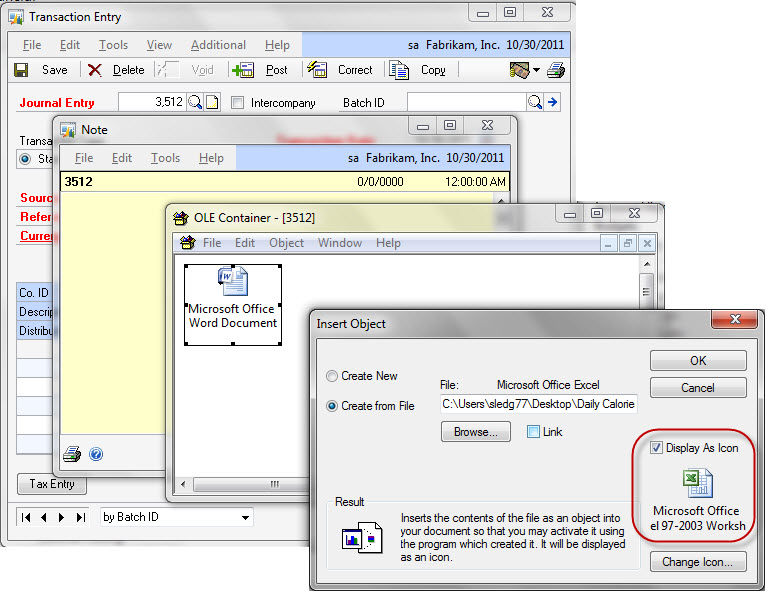
Can I attach multiple documents to a Note?

Yes. When you attach your documents, make sure you check the 'Display as Icon' box in the Insert Object window.

*click image to enlarge
 
Otherwise, when you attempt to attach the second document, it will superimpose over the first document in the OLE Container.

October 29, 2011

GPUG Summit is fast approaching


GPUG Summit 2011 runs from November 7th through the 11th this year at Caesar's Palace in Las Vegas and promises to be the best Summit ever. 


Yours truly is teaching a couple of classes and doing a couple other presentations:


Classes
'Beyond the Basics - Financials'
'Beyond the Basics - Distribution'

Sessions
'13 Classic Underused Features in GP'
'Using Job Costing as Project Accounting Lite'

I hope to see some of you there and have the opportunity to meet face-to-face more of the wonderful members of the Dynamics GP community that I only know via online interaction.

There's still time to register so if you haven't yet and you don't want to miss one of the premier Dynamics GP learning and networking events of the year, click on the Summit logo above to sign up!

October 28, 2011

Dynamics GP 2010 Installation & Configuration

After many years of intending to take this exam, I finally did it this week.  And wonder of wonders - I passed first time! LOL

Actually, it wasn't that bad.  The Install & Config exam is 75 questions and covers 8 separate areas of knowledge from Preparing the GP Environment to Optimizing Performance to Configuring Reporting.  I used the Install & Config E-Learning from Microsoft and it did a pretty good job of preparing me for the exam.  Save your money on the practice tests available on the web, however.  The questions contained in the $79 practice tests are the very same practice questions found in the E-Learning material and bear very little resemblance to the actual test questions.

Now I have one more logo to put on my business card:

Professional Services Tools Library

Did you know that PSTL is now a standard part of Dynamics GP 2010?  This previously optional set of tools from Microsoft now comes as part of the GP 2010 installation media.  While many of the tools still carry a cost, there are 14 tools that come FREE, meaning you don't have to have the PSTL registration keys to activate them.  See the checked items below - these are the freebies:

*click image to enlarge

Many of these tools were available free before but you had to install them individually as .cnk files.  Now they're all available in one spot.  For a detailed description of what each of these tools do, refer to the PSTL .pdf document that comes with the installation of PSTL.

October 26, 2011

That Pesky Print Dialog Box

Want to get rid of it?  Here's how -

*click image to enlarge

Go to Administration>>Setup>>Named Printers.  Click on the 'Machine ID' link.  In the Named Printer Options box, check the 'Do Not Display System Print Dialog'.

*click image to enlarge

That's it!  The Print Dialog box now will not appear when you print your documents.

October 5, 2011

Congratulations to Mark Polino and Siva Venkataraman - MVPs for Another Year!

There are no two individuals who are more deserving of this award than these guys.  I'm proud and honored to call them my friends and to occupy the same space in the MVP world with them.


Congratulations Mark and Siva!  You add immeasurably to the Dynamics GP community.

September 6, 2011

Taking you to the Fourth Dimension . . .

Here's a little trick I ran across a couple weeks ago. I have a client that needed more dimensions on certain accounts. They'd been using the first two User Defined Fields (UDF) in the account card but needed more, and needed to be able to pull this data into SmartList. Unfortunately, the canned SmartLists expose only the first two UDFs. So, here's how we resolved the issue.

* click image to enlarge

First, you need to use SmartList Builder to use this solution. That's because UDF #3 and #4 for some strange reason are not exposed in the canned SmartLists even though they are stored in the same table as UDF #1 and #2 - GL00100. Go figure.

Next, replicate the appropriate canned SmartList using SmartList Builder and expose UDF #3 and #4 in your new SmartList. (UDF #3 and #4 are identified in GL00100 as USRDEFS1 and USRDEFS2).

Finally, change the UDF labels in the General Ledger Setup window (Financial>>Setup>>General Ledger) and enter the appropriate field values for all UDF's in your account cards.

Now you can run your SmartList and sort and filter on all four UDFs instead of just two.

August 15, 2011

What's New in GP 2010 PO Returns? Replace Returned Goods!!

You can process returns against both Purchase Order Processing receipts and Inventory receipts. Items that have been received on a shipment or shipment/invoice receipt are available to be returned as a Return or a Return w/Credit document type. Items that have been transferred to another site, added to inventory through an inventory adjustment or variance, or returned by a customer are available to be returned in Purchase Order Processing as an Inventory or Inventory w/Credit document type.  New to GP 2010, Replace Returned Goods automatically updates the PO that the items were received on originally to allow the items to be re-received.

 * click image to enlarge